This setting is designed for when you have a good amount of PV production and your batteries are at a certain SOC, you can activate the smart load to power up an immersion heater for example.
To activate smart load, follow the steps below in Sunsynk connect.
Step 1 – From the settings menu, click auxiliary load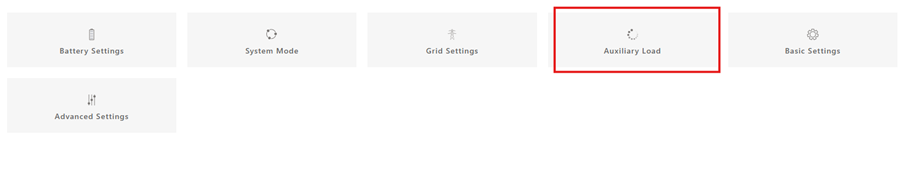
Step 2 – Select Aux load output and click save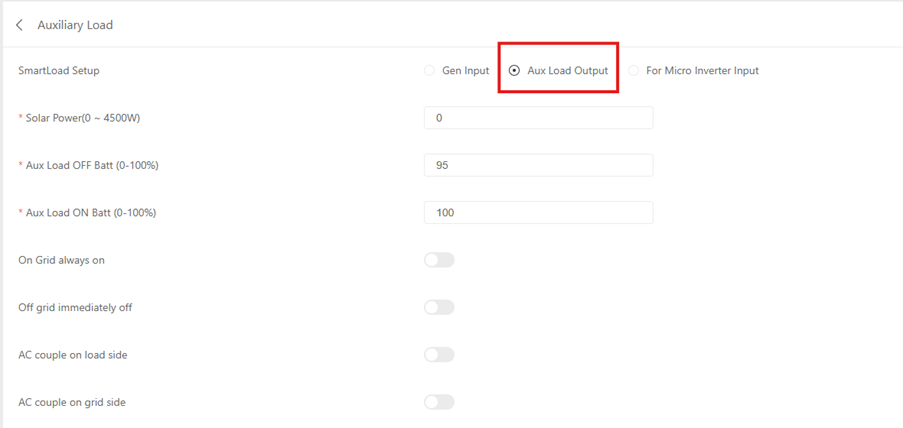
Settings explained:
- Solar Power – This is the minimum W of solar production for the GEN port to become active (This also requires the Aux load ON batt to be above the set SOC).
- Aux Load OFF batt – SOC percentage for when the GEN port will stop emitting power
- Aux Load ON Batt – SOC percentage for when the GEN port will start emitting power
- On grid always on – This will bypass the above settings and always output power from the GEN terminals whilst grid is connected
- Off grid immediately off – This will stop emitting power from the GEN terminals when the grid is lost
Connections
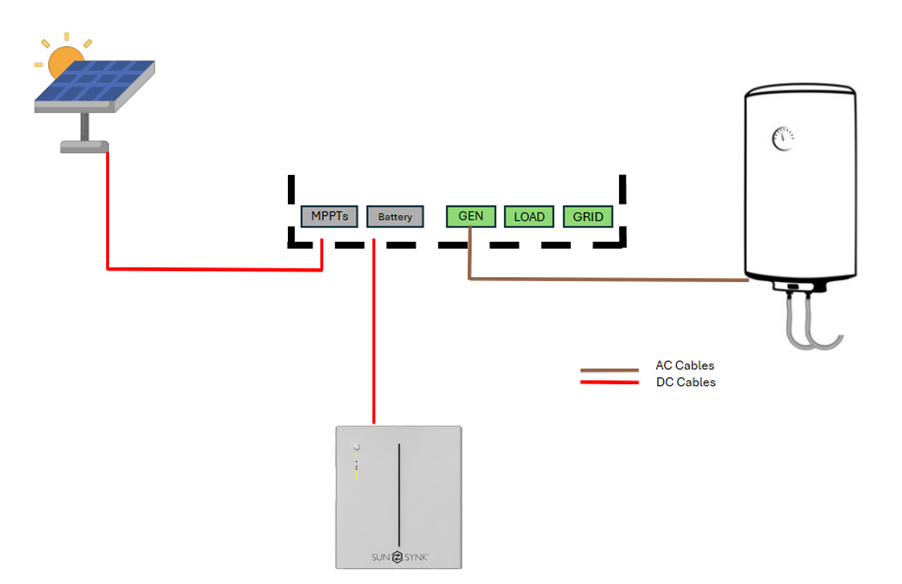
Example setup
Solar power : 1000W
Aux Load OFF : 50%
Aux Load ON : 80%
With the settings above if the solar generation is below 1000W but the battery is above 80% the GEN port will NOT emit power. If the solar generation is above 1000W and the battery is above 80% then the GEN port will emit power and will then turn OFF once the battery SOC reaches 49%.
Was this article helpful?
That’s Great!
Thank you for your feedback
Sorry! We couldn't be helpful
Thank you for your feedback
Feedback sent
We appreciate your effort and will try to fix the article