HV battery Recharging
Please read this document in FULL before starting the process.
This can only be done with a DC changer that must be able to produce a voltage of up to 52V.
Safety
- Using a DC charger to recharge batteries can be dangerous if done at to high of an amperage and if not monitored when the battery is reaching voltage. Over voltage can lead to damage of lithium cells and fires.
- These batteries must NOT be left unattended overnight whilst charging.
Instructions
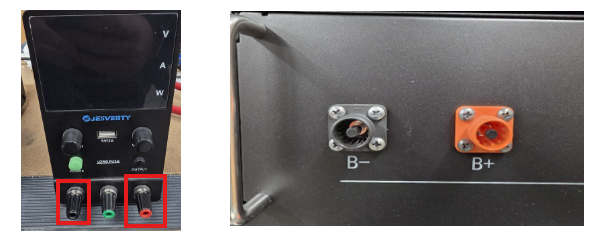 2. Set the DC charger to OUTPUT, to 52V and at 1A, The low amperage is to ensure that no cell damage can be caused.
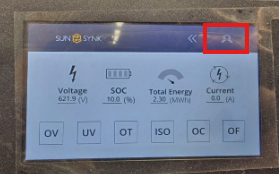 From the main menu click the top right button.
Use code 123
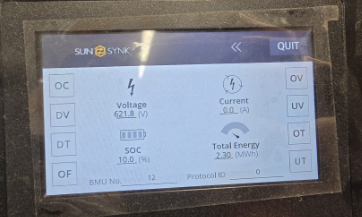 Once at the home screen swipe left until you see the screen below
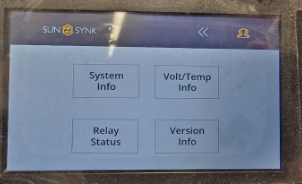
Select Volt/Temp Info
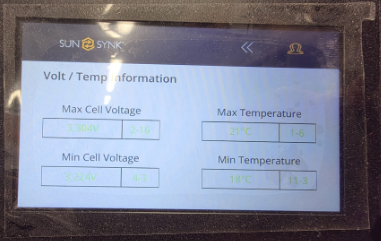
Take a photo of this screen and send to us with the ticket thread
5. Please Note the above must be sent to us before we can continue with the process.
6. After we have replied to your email, please then send us your BMU where we will reconfigure some settings and send this back out to you with instructions on how to recharge your batteries.
When you receive the BMU back the batteries MUST charge to 100% via the grid.
Please call us on 0151 832 4300 if you need any assistance
Was this article helpful?
That’s Great!
Thank you for your feedback
Sorry! We couldn't be helpful
Thank you for your feedback
Feedback sent
We appreciate your effort and will try to fix the article